


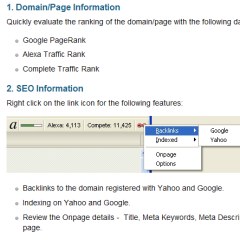
After months of testing, we're releasing our new Firefox SEO Toolbar.
Go here to install it: SEO Toolbar for Firefox
I have used a lot of different toolbars in my time, some good, some with a million and one bugs. The thing that I like about the new Affilorama Firefox SEO Toolbar is that it is simple.
It is there to perform a distinct few tasks and perform them well. And it doesn't have to take up extra space on your top toolbar, I like to go with the default setting where it fits nicely on the bottom right of your browser window (thus not reducing your browser window size like some toolbars do). Although you do have the option to position it wherever you want in your browser.
What this toolbar does is it provides you with very useful information and data to make the analysis of domains and pages really easy.
For instance, you might be visiting a blog or a forum, and you may wonder whether or not links from that particular website are 'no follow' or not. All you need to do is click on the link icon and any no follow links will appear completely red or grey with red dotted lines around them (depending if they are internal or external links).
This is the short list of features:
Quickly evaluate the ranking of the domain/page with the following data:
- Google PageRank
- Alexa Traffic Rank
- Complete Traffic Rank
SEO Information:
- Backlinks to the domain registered with Yahoo and Google.
- Indexing on Yahoo and Google.
- Review the Onpage details - Title, Meta Keywords, Meta Description and H1, H2 tags on the page.
Link Scanner:
- Links to any external domains, so you can rapidly scan a page to get an idea if there is an opportunity to get a backlink to your site or how it links out (grey by default).
- No follow links so you can quickly evaluate whether links from this site are no-followed or if a site is "blocking" any links (red by default).
Domain Information:
- Check the Whois information on the domain.
- Read the robots.txt file on the domain.
- Check when the domain was created and how old it is.
- Check if the domain has an XML sitemap, and look at the contents.
We will add more features over time to this toolbar, but the aim is to keep this simple, provide extremely useful tools and be unobtrusive (unlike other toolbars that can prove to be confusing and can really get in the way of your regular browsing).
Go here to install it: SEO Toolbar for Firefox
I look forward to your comments.
Make $10,000 per month as an affiliate?

Mark Ling


View all 55 comments (Currently displaying latest 50)
Daphne Spurlock • 17 years ago
Your teaching me a lot about SEO. This is something that I will master using! Thanks for keeping it real.
Daphne Spurlock from Make Money Online
William • 17 years ago
Jonathan • 17 years ago
Brian Mcandy • 17 years ago
Randy • 17 years ago
Randy • 17 years ago
Fred Williams • 17 years ago
Tom • 17 years ago
Best success,
Tom
yusuf • 17 years ago
Viju Dallon • 17 years ago
Respect,
Viju Dallon
Joseph Ting Yue Sheng • 17 years ago
travian • 17 years ago
frank • 17 years ago
I tried to install the new toolbar - your link just brought up a page full of addons - do I have to choose each addon seperately or is the toolbar ready to go?
Thanks
Frank Kelly
John • 17 years ago
reviewsandbonuses • 17 years ago
nancy fitzpatrick • 17 years ago
Richard Ingalls • 17 years ago
Jeromy • 17 years ago
Looks like a great plugin and considering how good your guys did with Keyword Travis I imagine it is solid. I have been using a plugin called SEO Quake and I like it. How does this one compare? Is it similar or does it do anything different? I don't mean to be so direct, I am just truly curious. Can I try it out with another similar plugin installed or do I need to first remove the other? I am interested in trying this one out. Traffic travis is such a great program, I am interested to test this one out too!
Cheers!
JeromyS
Troy Todd • 17 years ago
You keep over delivering to the members.
The no follow tool is great.
Regards
Troy
Mark Ling • 17 years ago
I personally also use SEO Quake but I have it turned off most of the time. It provides great results but it takes up too much space at times and fills up my search results and other pages with data that I'm not always looking for. I switch it on when I need to use it.
With the Affilorama SEO Toolbar it includes the information that I want to know at a quick glance (such as the alexa rank of a website, whether or not the links are follow or no follow, who owns the domain and so forth), without cluttering up my toolbar or browser window with other data.
Some other toolbars out there are great, but I find that I have them switched off most of the time due to the clutter. SEO Quake is my favorite of the other toolbars. I set this Affilorama Toolbar up for myself originally, then released it to my staff, and now have released it to you guys as I know you'll find it useful. We will be adding more features to it over time, but we do want to make it simple, but effective, without being cluttered.
Dave G • 17 years ago
Really appreciate you making this available to us.
You are right - this is the right compromise level of data that we need as marketers.
Some of the others are great - but overkill......... paralysis by analysis indeed!
Thanks again
Dave G
Kenn P • 17 years ago
Titanphil • 17 years ago
Thanks
Get on Google • 17 years ago
Max • 17 years ago
When I disabled it and restarted Firefox the links were back to normal.
Simon Slade • 17 years ago
Technology Electronics • 17 years ago
Thanks for share it..
it's power :) :D
Dennis Cook • 17 years ago
Joan Stalker • 17 years ago
The backlinks feature does not seem to be working properly for me e.g., it shows 18,100,000 links for my dog training site. I wish! Am I missing something?
Jeff • 17 years ago
Lim Eng Cheng • 16 years ago
Thanks Mark, great tool, I like it's simplicity.
Nick Fauchelle • 16 years ago
p90x • 16 years ago
Nick • 16 years ago
My complaint however is the dumb add on tool bar which you bundle in with it (MY WEB Search) . Dont lie and say your going to do something and then go and do the opposite with another BS toolbar. Thanks but no thanks.
Dan Wardrope • 16 years ago
Dan
brad • 15 years ago
update soon?
Matt • 15 years ago
Marc • 15 years ago
Libby • 15 years ago
However I am still seeing a dash for the Alexa rank when I use it on my PC (Firefox 3.6) and on my Mac (using Firefox 4.0) I can't use it at all :(
Do you have any idea when you are likely to do an update?
Many thanks
Libby
Victoria Pilkington • 15 years ago
When will you be updating the SEO tool to be compatible with Firefox 5.0?
Ron • 15 years ago
Instinctis • 15 years ago
fauzi musa • 15 years ago
Cecille Loorluis • 15 years ago
We have updated the Affilorama SEO toolbar. It is now compatible with Firefox 6:
https://addons.mozilla.org/en-US/firefox/addon/affilorama-seo-toolbar/
James • 15 years ago
Daniel • 15 years ago
Simon Slade • 15 years ago
InstinctIS • 15 years ago
Simon • 15 years ago
Simon Slade • 15 years ago
Mark • 14 years ago
It won't highlight with the cursor and Ctl-C doesn't get it either.
Please say there is a way to do this.
Thank you.
Linda Rinne • 11 years ago
Where would it be ?
Thanks,
Linda
Melissa Johnson • 11 years ago
try this link: https://addons.mozilla.org/en-us/firefox/addon/affilorama-seo-toolbar/versions/?page=1#version-0.986
View all 55 comments (Currently displaying latest 50)