


Are you frustrated that the search engines don’t seem to be finding all the pages on your new website? Or perhaps you’ve been adding some great new content every week, but every time you do, it seems to take FOREVER to get indexed?
As an affiliate marketer, there are lots of times when you feel like giving the search engines a damn good hustle along. Luckily, there is a more effective way to do it than glaring at your computer screen and emitting a few choice words!
Pinging your website is the online equivalent of waving a flag and yelling, “Hey! Over here – check this out!” to search engines and directories whenever you add or make major updates to the content on your site. Using a Ping tool can speed up indexing because it essentially sends search portals and other services a message from your website telling them that there is new content and to come crawl it.
Although ping tools were originally designed for bloggers publishing daily, they can be used successfully on any website with fresh content, including your Squidoo lenses.
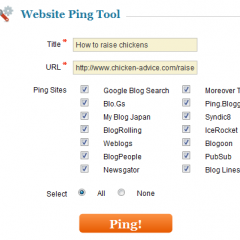
To make pinging nice and easy for our affiliate marketing comrades, we’ve just released a Website Ping Tool.
It’s very simple to use. Just enter the URL for your website homepage, or the specific page containing the new content you want to be found, and Affilorama’s Ping tool will alert sites like Google Blog Search, Moreover Technologies, Syndic8, Ping.Bloggers.Jp and a whole bunch of others that you have new content ready to share with the world.
Pinging your website is a good practice to get into as it can make a noticeable difference to how quickly your new content and pages get indexed. At the same time, you need to remember that it is only one tool in the toolbox required to get your website ranking well and receiving lots of traffic. While pinging is definitely worth doing, the results can vary and certainly aren’t guaranteed. You should still work hard building backlinks and doing all the other stuff we teach at Affilorama.
Before you get started, here are 3 important things to know about Pinging:
- You only need to use this tool when you add fresh content to your site or make major updates. ‘Extra’ pings won’t benefit your site and could even cause your IP address to be blocked by some services.
- There is no limit on how many times you can ping your website every day – as long as you are adding new content for every time that you ping.
- Adding new content to your site is a very good thing in general and you should aim to do it at least once a week.
Start using our Ping Tool right away! You can find instructions and FAQs next to the tool. If you're not a Premium member, then sign up today to access the Ping Tool, plus 13 other clever tools Mark has had custom-designed for himself and other affiliate marketers. These are exclusively available with premium membership!
I’m also keen to hear about your experiences with pinging and other ping tools. Are you in the habit of pinging your websites? Do you notice a difference when you do ping new content? I look forward to hearing your thoughts.
Make $10,000 per month as an affiliate?

Grace Harman


View all 138 comments (Currently displaying latest 50)
James • 14 years ago
naltrexone implants • 13 years ago
MICHAEL K AGBODAZE JR • 14 years ago
derek fitch • 14 years ago
Rick • 14 years ago
This information is very helpful for me to understand about website ping process and importance of it. Thank you for sharing.
Thanks,
Rick.
Prime Aque • 14 years ago
ferry • 14 years ago
carend des • 14 years ago
Jason • 14 years ago
Pantofi • 14 years ago
Michelle • 14 years ago
John Smith • 14 years ago
Please sort my problems ..Thanks
Jay • 14 years ago
tom troy • 13 years ago
Azim Mondal • 13 years ago
Ngenda Mulonda • 13 years ago
Jeremy Feldmesser • 13 years ago
Jhoveleen Dee • 13 years ago
Leverage • 13 years ago
Delhi Advocates • 13 years ago
Thabang S. Nkoana • 13 years ago
San newton • 13 years ago
Cecille Loorluis • 13 years ago
Natural backlinks are from sites that linked to you, without any effort on your part. A good example is when a Facebook user stumbles across your webpage, then shares the link to it on their Facebook Wall. That is a natural backlinks.
There are backlinks that you would create yourself like when you submit a post in a forum with a link back to your site. This is natural, but it's not un-natural either.
Un-natural backlinks are those that are created by software, or by automated applications. These tend to be spammy and can have a negative impact on the site.
Hope that helps. Have a good day!
Stuart • 13 years ago
What is the feedback compared to using manual sites?
Cecille Loorluis • 13 years ago
I haven't tried the MaxBlogPress Ping Optimizer on own sites, but I've heard good feedback from it. It allows you to schedule the pings that Wordpress sends. It's all done within your Wordpress site so there's the ease of convenience.
It is essentially a plugin for pinging sites, similar to ping sites like Pingler.
Hope that helps. Have a good day!
Socialkenny • 13 years ago
Cecille Loorluis • 13 years ago
There's no catch to it. All pinging does is to let search engines know you made changes to your site or published a new article. We strongly recommend it so that your site will get indexed faster, but be mindful not to overdo it.
Hope that helps. Have a good day!
best buy credit cards • 13 years ago
Cecille Loorluis • 13 years ago
Pinging does not help your site get more backlinks, but pinging your backlinks helps them get indexed faster which in turn helps your site's ranking.
Hope that helps. Have a good day!
Lee • 13 years ago
You can ping to 2500 sites.
Great for backlinks also.
sujeet • 13 years ago
Cecille Loorluis • 13 years ago
If your site has a built-in feature to ping search engines each time you have new content, or have made changes to any of your articles, then you do not have to ping search engines again. What you can do instead is to check and collate your new backlinks and pins those instead so that they get indexed faster.
Hope that helps. Have a good day!
Jonny • 13 years ago
Nauman • 13 years ago
Melissa Johnson • 13 years ago
Somesh • 13 years ago
Cecille Loorluis • 13 years ago
You can use services like Pingler.com or Pingomatic.com to ping your site URLs for free.
Hope that helps. Have a good weekend!
wajid khan • 12 years ago
jack wang • 12 years ago
Melissa Johnson • 12 years ago
The general rule is to ping your site when you have some substantive new content to share, such as a new blog post. If you do a massive overhaul, don't ping every time you change something, though.
Rosa • 12 years ago
Melissa Johnson • 12 years ago
Pasca • 12 years ago
Can the ping produce some problem with google?
I don´t want to be blocked by google.
Thanks
Melissa Johnson • 12 years ago
Pinging in itself won't hurt your SEO. It actually exists to tell search engines there's something new to check out. If you do a massive ping and suddenly Google registers thousands of backlinks in a day, however, it's going to get a bit suspicious. That might cause some penalties. But if you ping occasionally and build your links naturally, that'll actually help your ranking in the end.
hope this helps!
Costa Blanca Murcia Property • 12 years ago
• 12 years ago
psingh • 10 years ago
I want to know one more thing if pinging is not create back link for website then what is meaning of pinging website with other ten twenty website
when i try to ping then get message like
like created and pinged
Melissa Johnson • 10 years ago
Pinging is a way to let the search engines know that you have new content and it should re-index your site, so that your page can appear on search engines. =)
spielzeugladen berlin • 9 years ago
Justin Golschneider • 9 years ago
Mayank Tanwar • 9 years ago
Justin Golschneider • 9 years ago
Urban Legend Leather • 9 years ago
Nikhol • 9 years ago
Anfed • 9 years ago
nirjon rahman • 9 years ago
Cecille Loorluis • 9 years ago
Hope that helps. All the best!
Fastest Credit Repair • 9 years ago
vinod kumar • 9 years ago
Mughal • 9 years ago
Because when I pinged my website using ping tool it says "Your website has been submitted to web directories for faster indexing''.
Kindly guide me, I am too confused.
Thanks.
Santosh • 9 years ago
Manan Singh • 8 years ago
Viber Mckay • 8 years ago
samuel • 8 years ago
View all 138 comments (Currently displaying latest 50)