


The following is a guest blog post by Matthew Carter:
Hey everybody,
So it looks like Google has brought out a new keyword tool!
I have recently spent some time using it, and overall I was really impressed with the new metrics and the way Google are displaying the keyword data.
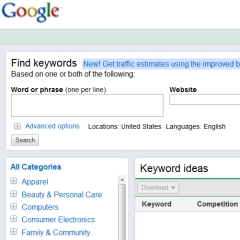
In this post I have provided an explanation with screen shots, of some of the initial things that I think are going to be really useful with the new tool.
The first and very obvious difference that I can see, is that Google now displays the search by "website" box in a very obvious place, which wasn't the case in the old interface.

Searching on websites for keywords is a great way to spy on your competition, and uncover all the keywords that Google thinks the site is about. These are keywords that you could consider targeting for your campaigns, and also use in your webpage content, as Google obviously thinks these words are relevant.
Another major difference that I can see is that when you search on a keyword, the results that Google gives are now related categories, rather than just words that contain your original keyword in them.
If you look at the example in the image below, I have searched for "learn spanish online" and will notice that Google now displays results for lateral keywords. For example "spanish courses" and even "learn German" and "learn Italian".
Although this may take some getting used to, as the results are no longer just keywords with your original 'seed keyword' in them, I think by providing lateral keywords, Google gives you some great ideas of other keywords, niches and even subniches you could potentially target.

If you look over to the left of the interface you'll see the categories that Google has included for the keywords that it's displaying. You can simply uncheck the boxes of categories that you are not interested in, and refine you search to categories you think are more relevant for you.
I think that this data on categories will be very helpful, however you can choose to search based on keywords related to the seed keyword also if you prefer. All you have to do is check the box at the top under the "Advanced options" that says "ideas containing my search terms"

Under the same "Advanced options" category, you'll also notice that Google has now provided the option for "mobile search". This is an interesting addition to the tool, as I think Google are possibly alluding to the importance of targeting mobile devices. Although the search results are not as high, I think this is something that Google feels is going to change, and perhaps something to consider for your own campaigns.
I'm not totally convinced yet, on the return on investment that targeting mobile devices will give at this stage, as currently the lack of flash videos on mobile devices is a concern. However, perhaps marketing some CPA form fill offer might work best.
One more feature in the tool, that I found interesting was over on the left menu, where Google has displayed, in blue text, the category that the keywords it is displaying fall under.
I find this fascinating as Google are telling you how they categorize their keywords. This sort of information is useful to know when you are building your sites. As to get the best effect for SEO, it's best to create a 'Silo' structure. Therefore you can now easily replicate the way Google does this and give back to them what they want. I can't help but think this will have a positive effect for your SEO.
Finally one more addition that is very obvious, is the inclusion of a link to "Google Insights" next to each keyword entry. This provides some very rich data on the history of the keyword in Google over time, and is excellent market intelligence data at the click of the mouse. You can immediately see if the keyword is experiencing positive growth or is declining.
All in all I think there are some great additions to the tool, however it will take some getting used to, as the major difference is the way Google now displays related keywords that are lateral to the original seed keyword phrase you searched on, mixed in together with 'lateral' keywords also.
I hope you enjoy this blog post, I'm really interested in hearing your comments below.
Also, if you gained value from this post, then you'll LOVE my new FREE report on How to get high search engine rankings and cash in with free traffic, I've already received over 200 positive comments about this report on my own blog already, I recommend you check it out.
Note: The above guest blog post by Matthew Carter may not reflect the views and opinions of Affilorama.
Make $10,000 per month as an affiliate?

Guest Account


View all 138 comments (Currently displaying latest 50)
William • 16 years ago
Ashley Joyner • 16 years ago
I think only time will tell if its going to be more helpful with my SEO research.
Carsten Dybkjaer • 16 years ago
I cannot find the possibility to download the keywords. Do you know if it is in the new version?
thanks Carsten
www.viaaffiliate.com
cat care • 16 years ago
Thanks for letting me know about this. I've been away for a couple of days so I'm looking forward to checking this out myself. Love how Google keeps making it easier for us marketers.
Henry Kunz • 16 years ago
I see in my part of the world (South Africa) it is still listed as a Beta version but it appears to be fully functional. I had not used the tool for a couple of weeks and I wasn't aware of the new release.
Thanks very much for a most informative overview of the new features.
Grant • 16 years ago
Estimated Average CPC shows up for me as soon as the keyword results are displayed.
I was simply logged into my Gmail account, which of course gives me access to all my Google services, and turned on that column.
Even tried switching some other columns on and off but could not get it to fail.
Perhaps try turning on ALL columns and see what happens.
Note sure why it may not be displaying for you.
Ian • 16 years ago
Ian
http://theaccidentclaim.com
John Vazquez • 16 years ago
Siddhu • 16 years ago
Colombia Ecoturimso • 16 years ago
STAIHARD • 16 years ago
Kim • 16 years ago
• 16 years ago
Thanks for following up on my question.
I have been in and I clicked on 'views' and found the option in there to select 'estimated AVG CPC', plus many more that I could have to show up in the results, so I'm all good now :)
Aaron Elliott • 16 years ago
I can't work out how to do this, but I remember I used to be able to do it fine with the old version, is there something Im missing?
Aidan • 16 years ago
dailybreakingnews • 16 years ago
Keep up the good work!
Cheers.
Chris Harrosh • 16 years ago
Patrick • 16 years ago
ampie_g • 16 years ago
TechCore • 16 years ago
Like you, we've been covering the Beta release as well, and I must say it's been an absolute treat reading your post as it is so in tune with a video we recently did about the subject and how Google's Keyword Tool Beta and The Internet Time Machine's Powerful PPC Niche Market Detection Technology tie in so well together.
The video is up on YouTube for you and all to see : http://www.youtube.com/watch?v=ePvBARGLOU8
Keep up the great work!
Kathaleen Dunford • 16 years ago
www.goldenbusinesssuccessandsolutions.com
Roshan Nepal • 16 years ago
Amin • 16 years ago
kay • 16 years ago
Con Van Dyk • 16 years ago
Gregory Lee-A-Ping • 16 years ago
French Property Agency • 16 years ago
http://www.frenchpropertyagency.com/
Aaron Elliott • 16 years ago
Jose • 16 years ago
Courtney Craig • 16 years ago
muslih72 • 16 years ago
thanks
Second Click • 16 years ago
ffbvgd • 16 years ago
got to keep going back to old
...
Barb Pattison • 16 years ago
Alyssa • 16 years ago
I can't work out how to do this, but I remember I used to be able to do it fine with the old version, is there something Im missing?
Kenny Perkins • 16 years ago
Miles • 16 years ago
simon • 16 years ago
junaid • 16 years ago
Joko Susilo • 16 years ago
Chester8111 • 16 years ago
blogger03 • 16 years ago
Another great tool to use can be found at http://www.visible.net/tools/keywords/
I look forward to reading more articles from you!
Gamertag • 16 years ago
david kimberley • 16 years ago
alen tower air purifier t300 • 16 years ago
Geollissinant • 16 years ago
Lisa Angelettie • 16 years ago
Carole • 14 years ago
Jamesspump • 5 years ago
Deiatlow • 4 years ago
View all 138 comments (Currently displaying latest 50)