Hi Everyone,
In todays blog post I'm going to let you know how I go about recording affiliate videos.
There are 2 ways of doing these kinds of videos.
- Recording them with me on camera, ie as a full motion video.
- Recording a powerpoint presentation, ie as a screencam video (usually at 1 frame per second).
From my experience, usually the 2nd method converts better to sales, but not always. I think it is due to the fact that the videos load faster and are usually better planned when they are powerpoint style.
The other reason is that if people have their sound turned off on their computer, they can read what is going on in my powerpoint presentation by reading the screen.
Full motion videos
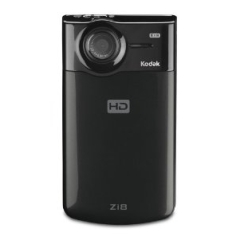
When recording full motion affiliate videos I use a Kodak Zi8 camera. These cameras are pretty cheap and yet record at high definition (not that you need HD for the web, but it's great for recording videos of my newborn son too).
I prefer the Kodak Zi8 over other 'flip cams' because it has a microphone jack (for when I want the audio to be better quality). I'm sure other brands will come with a microphone jack soon, but they didn't when I bought my Zi8 a few months ago.
To see an example of one of my affiliate videos using the Kodak Zi8, see this video of me here promoting a product on how to pick up women using magic tricks:

Click to open in a new window
You don't have to go as far as I did in that video (ie interviewing the product owner) in an affiliate video, you can just talk about the product, but I thought it was a good one to show you as the guy I had in the video showed some cool tricks :)
Actually, I should also give credit to Brad too, the guy in the video above. He's the one who put me on to the Kodak Zi8 in the first place.
I edit my videos using Sony Vegas Movie Studio, it's under $100 and very powerful and only took me a few hours to learn how to use a few years ago.
Powerpoint Videos
When recording powerpoint videos, I simply write up my slides on powerpoint, then I use camtasia to record my screen. And that's it.
If you want a free alternative to using Powerpoint and Camtasia, you could always make your slides using free software like Paint.net and you could record the video using JingProject which has a good free version (pro version is only $14.95 per year anyway).
I hope you enjoyed this blog post.
Oh and the best comment below wins their choice of a Kodak Zi8 or Sony Vegas Movie Studio for themselves, so post something good :)
All the best,
Mark
Update: Selecting a winner of this little competition has been really HARD. There has been so much great advice given below, the comments were even better than my post lol. I've decided to go with Andy Dee as the winner as he has submitted several great comments (not just 1) that were very helpful. This was a hard choice as so many of you supplied such helpful answers, I gained a few little resources myself :)
View all 112 comments (Currently displaying latest 50)
Amanda Bone • 14 years ago
Also an alternative to Camtasia is Cam Studio at Camstudio.org (open source). I really like open source programs. They tend to work well and they are free!
OpenOffice.org has one of the best office software packages around. It is also open source. Their version of PowerPoint is called Open Office Impress. These programs work just like their Microsoft versions but are more compatible with other document types. The wonderful thing about OpenOffice is that you can save your projects with file extensions that are unique to other programs such as Microsoft Office. This is helpful if you want to work on a project at work where you have PowerPoint and then want to take it home and work on it with OpenOffice.
I currently have a the paid version of Jing. I can't tell you how many visitors I have received from youtube. It is amazing. I simply set jing to record, talk into my mic, and show someone something useful on my computer screen and bam! it is being uploaded to youtube.
Google loves youtube and it is fairly easy to get rankings with videos where text ranking would be near impossible.
Now youtube allows you to add little conversation bubbles to your videos which are perfect for web addresses.
Also consider how many sites you can upload videos to! There is a free service from TubeMogul.com which makes this very easy to do. As of yet search engine spiders can not detect video as duplicate content. As long as you are giving your video different titles on each of these video sharing sites you could use one video and rank for several different keywords.
Technology is amazing!
Fransisco Brevoort • 14 years ago
Chris Botha • 14 years ago
While we're on the subject of recording videos, I would like to elaborate more regarding the video recording for the Power Point slide shows.
I would like to share an invaluable tip for my fellow internet marketers regarding "Video Skinning", and I've had conversions gone up by 30% by following this method. And, it's really very simple to do if you have the right tools like Camtasia that you're talking about in the post.
What it basically boils down to, is to convert your affiliate product page into a video. Now some of you may ask:"But how do I do that?".
Here is my 10-step "Success Video Skinning" tutorial for you to follow:
1. Get yourself a screen recording tool like Camtasia Studio, or any one of the other screen recording tools Mark is referring to.
2. Go to your affiliate main product page that you are promoting, and start dissecting the sales copy and grab pieces of content and implement it onto your Power Point slide show. Generally, bullet points contained within the sales copy can be used to display this on a Power Point page, how many you ever need.
3. After setting up your slide slow with extracted pieces of information and images of your product's sales copy, have a copy of the original sales letter in front of you, or on another screen where you are going to read from, while you're recording the slide show. Remember to make this sound natural and not make it sound so obvious that you're reading a script.
4. As you record your voice while reading off the sales copy, anticipate when to change the slide show to the next set of highlights or bullet points within your presentation. Create an even flow of you talking and what is currently being viewed in your presentation. I like to call this the "Waterfall approach". Make everything you do in the video presentation flow consistently like a waterfall.
5. Set the appropriate mood for your presentation with some nice background music playing softly in the background while your presenting your prospect with your video offer. Background music has proven to set the "emotional mood" for taking action more over a presentation with just someone chatting away. It prevents the prospect from getting use to your voice and loosing concentration.
6. Follow this guide for working with background music in Power Point. http://www.howtodothings.com/computers/a3644-how-to-get-free-background-music-for-power-point-presentations.html
7. To give you an excellent example the effect background music has on a website, visit this link and make sure your speakers are turned up: http://www.origenmusic.com/world-music.html
See what I mean? :)
8. Here is 2-of many other resources for you to look at where to get hold of such background music for the appropriate atmospheric mood you're after:
Note: (I have funny spaces in the URL which you can remove since Mark's blog think this post is spam probably because of these URL's within my content. "sigh" :P )
- "w w w . royaltyfreemusic . c o m"
- "w w w . opuzz.c o m"
9. VERY IMPORTANT: When playing the video, ensure you hide the video control bar in order to prevent your prospect from fast forwarding or seeing the length of the video. This forces him to sit and watch your presentation from start to finish. And in almost all cases, human nature will get the better of your prospect. Testing this method has proven effective time and time again, since it's just human nature to be curious as to "what is going to happen next?", or "what am I going to miss out on if I stop watching now?". So by doing this, you are sure to know that your visitor is getting the ENTIRE message delivered to him, without him being able to skip and scan. :)
10. Have a call to action button directly below your video!! It must be nice and big and clear what you want the prospect to do. No point in getting your visitor all fired up and ready to buy from you but he's having a hard time what to do next. So make it clear and visible directly beneath your video. When this action button is clicked, take your prospect directly to the payment screen or Clickbank payment screen should you be promoting a Clickbank offer.
Well, there you have it. Priceless information for you to go and test out immediately. Good luck, and be sure to inform us of your increased conversions. :)
And remember, have fun!!
Enjoy!
Regards,
Chris
Chuck Hugan • 14 years ago
Glen Wayne • 14 years ago
You've got me interested now in these type of cameras and it looks like the Zi8 has another huge advantage over the Flip Cams and that is the ability to insert up to 32 gigs of memory using an SD memory card.
It is also cool that these cameras are small enough to slip them into your pocket and enjoy using them just about anywhere.
Regards,
Glen
Brian • 14 years ago
Thanks for the info -- making video's -- I was not planning to
watch much of the video on pumaseduction. But liked the match
trick. So does he ever show how he did it, in the video? You just
got to smile when you see that. --- enjoy
Andy Dee • 14 years ago
Great post! I'll throw in some of my thoughts:
1. For those of you promoting physical products (which is highly advisable, depending on the niche/product/offer) it's a great idea to talk to the manufacturer, distributor, or your affiliate manager to send you out a reviewable demo of the product. Then, take your cam and show yourself, or friends/family in action with it. Try to touch on all of the benefits of the product in the video, by showing it being used to that effect. Talk to the product creator, if possible, and "interview" them. Use Skype, and record with a plugin called Pamela. Then, you can edit with a free software called Audacity to touch it up a bit, and import this into your video as you see fit. Very powerful stuff! I've done this with about 12 different offers now, and all have performed very well for me.
Editing is easy. If you're on a PC, use Windows Movie Maker (comes pre-packaged with your Windows install for free!). Also, you can import this footage into Camtasia (can't recommend purchasing this enough!!!) and spruce it up with captions, callouts, titles, etc.
This is the exact formula I use for selling physical affiliate products with a very high degree of success. Obviously, high quality traffic sources are key, but that's best left for another conversation.
2. Also, Mark's recommendation on the Zi8 is spot on. I, unfortunately, bought a few cameras in the Flip family, and without the mic input, it's hard to get the audio quality you need for a higher quality production.
Fortunately, I've got a Canon HV-20 (great camcorder!) with mic input, and I plugin my wireless lavalier (clip mic) into this for really high quality audio in interviews, workshops I give, etc. I'd love to try out the Zi8 though, as I've heard it recommended numerous times now.
3. The content of your videos is just as important as the way you go about shooting them. For most beginning producers, sticking with the basics (screen record with Powerpoint) is recommended. You're still going to get great results, above and beyond what other marketers are doing, simply because you're using video.
Keep the rambling short! People are going to be able to read faster than you speak. So keep your slides succinct, and straight to the point. Videos become detrimental when you lose your viewer in the process. I'm sure you've experienced this already.
Hammer on the benefits! Focus on the "what does this mean for the buyer" mentality, and your scripting will be a breeze. If you need help, talk to your affiliate manager. Get a hold of the product creator personally, and ask these questions.
Spice up your vids with good music! There are plenty of places where you can find high quality, free music clips, but if you've got the budget, invest in some paid royalty-free tracks. Can't beat high quality music.
----------------------------------
Andy Dee
JEFF DAVIES • 14 years ago
Jeff Walters • 14 years ago
It's interesting your experiences with the two types of video marketing you mention that you seem to get a better response with regards to making the sale from the powerpoint videos.
It may be that having to actively read the sales message does something psychologically to the viewer that actually engages them in the buying process while just observing someone speaking the message leads to the viewer becoming passive and not engaged in the process. (After not watching TV now for about 10 years when I observe other people watching TV it amazes me as to actually how "entranced" and "zombie like" they are.)
It makes me wonder also if it's because the people making the purchases are making their buying decisions based on active reasoning, that they think the products you are promoting in the individual videos will really help them solve a problem they are having or will enhance their ability to accomplish an objective rather than just being impulse purchasers.
It would be interesting to test both types of videos promoting products that are primarily impulse purchase types of products, and do the same thing with products that are designed to help the purchaser actually get a specific objective accomplished/problem solved and see if the individual types of videos pull better results based upon whether the products they are promoting fall into the categories of impulse purchase or problem solving/objective completion.
The results might indicate that the different video types are better suited to different product types for future promotional efforts. Maybe even provide a bit of an advantage, marketing/sales/competition wise.
Just a thought.
The whole marketing/advertising/selling/purchasing process reminds me of watching a video series some years back called "The Century of The Self. It's a 4 episode series consisting of:
Episode 1: "Happiness Machines"
Episode 2: "The Engineering of Consent"
Episode 3: "There is a Policeman Inside All Our Heads: He Must Be Destroyed"
Episode 4: "Eight People Sipping Wine in Kettering"
that explains among other things, how Edward Bernays (Sigmund Freud's nephew) was hired to develop new ways to help corporations sell more of their products and how the populace basically became guniea pigs for the testing of how well different promotional methods worked. Thus began the whole advertising/marketing industry and much of what we consider state of the art promotional methods of today are just enhanced versions of what was discovered along the way through the use of psychology and even programming.
If you or your students/readers haven't ever seen the documentary you can find it on YouTube at this link
http://www.youtube.com/watch?v=3dA89CBBOC0 it's pretty interesting.
Anyway I shall have to leave the testing to you, if that's something you're interested in, as I'm just beginning to set up my first website and am not equipped to do anything of that nature as of yet.
If you should decide to test the idea I'd be interested in what your results showed.
Jeff Walters
gainsvillesun • 14 years ago
Your free help has been so helpful, I made my first $21.45 a few months back due to following some of the advice you sent to me via e-mail. I used to feel like an idiot after spending lots of $$$ on Adwords, having high click trough and no sales =( Now I also want to start making videos, perhaps it can help with the conversion rate!
Thanks
Corey • 14 years ago
paulita • 14 years ago
Thanks to everyone for sharing so much important information.
I have been learning a lot!
Curt D • 14 years ago
Couldn't agreee more on the Zi8. The output jack is AWESOME!! It makes such a difference in sound quality.
I am a huge fan of Camtasia 7.0, too. It does much better with HD and widescreen stuff than previous versions. You can see from the above video I go from live widescreen with a zi8 and mic, to Camtasia 7.0 with zom and pan stuff.
Cheers.
Curt
Internet Time Machine
Ross Scott • 14 years ago
Thanks a lot for introducing the Zi8 to me. I have been looking at buying an HD camera for a while now and have been looking at the Flip Ultra HD. You have me sold on the Kodak Zi8 especially with its image stabilizer, smart face tracking and the output for a microphone jack makes it looks like a great choice.
By the way has anyone used a Zi8 with a Sony ECM-DS30P Electret Condenser Microphone Stereo ??
Mark, I think you should choose me to win a Kodak Zi8 as I am getting married this year on the 30th of July. I would love to win this camera and stick it on a trip pod or give it to my brother to record our wedding ceremony.
Would even be willing to share some wedding footage with the affilorama.com family here in the future, shot with the Zi8 if you choose me.
Spy Software • 14 years ago
Jan • 14 years ago
Jan • 14 years ago
Helen • 14 years ago
Months ago when I first discovered Mark's website, my internet connection was patchy (wireless and sometimes in a bad area).
I tried and tried to watch the video links Mark provided, but I would get 5 seconds video, then 5 seconds with the whirring circle in the middle of the screen, then 5 seconds video, and I thought damn, I really wanted to watch this video, but it was just toooooo sloooooowwwww.........
And I thought, I don't have time for this, and unfortunately I gave up trying to watch the videos, and missed all that good information.
But, watching the video about the guy turning one dollar into $20 (and yes, you can buy me a drink anytime, darling), the video kept playing without interruption.
And I thought, hey this is great viewing, no stopping and starting, uhhhh..uhhh...ohhh...ohhhh....,uhhh.... this camera Mark was using must be excellent for getting the resolution right, for recording videos that need to get played back online.
Thumbs up (with a white rabbit on top!)
Cheers from Helen
Stew Shaw • 14 years ago
But what I want is a state of the art video cam that works some magic on overweight presenters, like you and me ;-)
Bryan Wong YH • 14 years ago
Mark Ling • 14 years ago
@stewshaw (and everyone else who commented on my weight): Sheez, you guys really know how to give a guy a complex lol. I do play squash and/or workout most days, but my belly always pops out for a bit after I eat :)
Also, anyone else use www.fraps.com that Fransisco suggested? How does it compare to Camtasia? It is a lot cheaper. Although www.jingproject.com is a pretty good alternative anyway (created by the same guys as Camtasia).
Mike Berry • 14 years ago
One tip i learned from a fellow expert Internet Marketer (actually he was on stage at the event where you & i first met in Las Vegas) was to use a monopod, because when held at arm's length, the height and stability (and arm's-length distance from your body) are perfect for video work.
Another tip I learned if using Powerpoint and/or Microsoft Movie Maker, is to record the audio FIRST (via audacity) by following your script, that way you can be word perfect and you are not racing along trying to talk at the speed of the slides changing automatically (took me a long time to suss that).
Sending love to Michelle & Benjamin
Mike ;-)
Kathaleen Dunford • 14 years ago
Certain people are very critical, aren't they? Quite a few people have a tummy that pops out after eating - it is often caused by food allergies or intolerances (eg, gluten). Such comments aren't worth the time of day, in my opinion.
Ming Jong Tey - Inbox Cash Techniques • 14 years ago
I have used Camtasia before and find that it is great tool. I have looked at Jing Project but haven't tried that out. Given that it is free and the functionality, it is definitely a good way to start.
Cheers,
Ming Jong
Andy Dee • 14 years ago
1. Gather competitive intelligence on the more highly viewed videos in their niche. A quick trip to YouTube should reveal what you need to know. Bring a list of a your top keywords, and search them in YouTube. Take a look through the videos that appear, and keep a log of the related videos, and video responses that YouTube shows. Look at the stats of each of these videos to see if there's at least a continuing, if not updward, trend of visitors.
2. For the best qualified videos, copy all of the related titles, and their tags, to a text doc. When you upload a YouTube video to your account, you'll want to use these tags. You can also promote your video as a response to an existing video. Titles/tags are important! Don't forget!
3. Additionally, you can use Tube Mogul to syndicate your video to multiple video sharing sites. This is a powerful service that I just can't live without. It's definitely worth checking into! There's a free option, as well as paid levels.
4. Most people STILL don't do this, and I don't know why... but, SEND BACKLINKS TO YOUR VIDEOS! Start backlinking directly to your videos, using words from your keyword list. Make sure to get a good variety in there, between forum links, articles from directory sites, blog posts, etc. Vary your anchor text too! Use the URL itself, product names, commercial intent keywords, etc. If you do this, your videos WILL get indexed in the rankings, and quite high, most of the time, for some high performing keywords. I outsource this to my team, and get fantastic results.
Any questions? Just ask!
-Andy Dee
Andy Dee • 14 years ago
I've been an advocate of using video in business for quite a while now, and now that technology is so affordable, education on actually being successful with it needs to catch up.
So, I'm probably shooting myself in the foot here, but here's one of the niches I operate in, where video brings me tremendous results....ready? FISHING! That's right. I promote affiliate offers for poles, rods, info products, etc. You name it. It's actually one of my better niches, and when I started using video the results improved a tremendous amount more.
Hop on the bandwagon if you want, but I assure you...the competition (me) is fierce!
Anyway...
When I'm doing product demo videos, there are a lot of action scenes. As you can imagine with fishing, I'm showing guys gearing up, interviewing them on the drive out, etc. Everything I can do to capture the experience, and get potential buyers hyped up.
Here's a hint -- If you're walking around with your camera in hand, hoping to get a quality shot...IT'S NOT GOING TO HAPPEN. At least in my opinion, shots like these are unbearable to watch. Yet, everybody shoots like this.
When I was first starting out, with little to no operating budget to speak of, I improvised most of my video equipment.
One priceless piece I constructed was a homemade Steadicam. If you don't know, a Steadicam produces smooth video when you're walking around with a camera. You can find directions online from multiple sources... just search for "homemade steadicam" or "diy glidecam".
Adding this into my video arsenal expanded my capabilities tremendously, and gave my productions an over-the-top quality when compared side by side to other videos people find online. In the fishing niche, there are already quite a few people using video, but most of it involves some hairy-chested, hairy-faced dude sitting in front of a camera, talking monotonously about, well...whatever he wants! We also have our fair share of Powerpoint screen captures as well, which when your presenter isn't the best vocal talent, is a bit of a burden to watch.
My action videos perform to a high degree. They play a large role in building up anticipation in the personal ownership of the product I'm selling. Add in nice titles, good music, and great on-camera personalities, and I can pretty much guarantee a win...albeit with the right offer.
Another homemade device you can use to spruce up your videos big time? A jib arm! You can make one of these fairly easily and capture some really cool sweeping shots. Gives a great "Hollywood" effect. If you're not sure what this is, just Google. Then, search for "homemade jib arm" and get to building!
I have a lot more advice on this topic...from formulating ideas, to production, all the way to marketing/syndication.
Mark, perhaps this calls for a guest post? Let me know and I'd be glad to put together a super comprehensive guide (I'm in the process of creating this anyway, for my clients) for all of the Affilorama readers!
-Andy Dee
Ken Phillips • 14 years ago
Won't make any comments about weight.. (hmm no wonder it is such a big niche!!) ..because people in glass houses and all that.
Fantastic tips as always and gotta use that match trick.
The look on your face was priceless so a picture DOES tell a thousand words.
Just got hold of Vegas and agree that it is a very versatile program. Easy to use and works a treat.
Thanks for the tips
Ken
Chris Robbins • 14 years ago
Thanks for another great post, so much to learn, just have to find the time to learn it all. Keep it coming
John Reason • 14 years ago
Thanks for that. So many things on this Internet Marketing jaunt that I am following seem out of reach, but it's good to read useful practical information that tells you how to do stuff-as simply as possible. Too many I.M "gurus" assume you know something or load you with info you'll never really ever going to get round to-and which does not help when you get round to it!
Arline Oliphint • 14 years ago
Great advice. I read your post and watched the video back when you still had zero comments... and I'm finally getting back here to make my own comment. I see there are many very well-written comments with ADDITIONAL great advice and tips! I'll be back again and again to learn more when I'm ready to make videos! I haven't tried doing videos yet, but NEED to... soon.
I'm glad you gave some free alternatives to Powerpoint, and more. It so happens I have a copy of Camtasia - I don't recall how I was able to get a free copy, I guess from some marketer as a bonus a while back. I've used it to record a few live presentations I've watched, for my own use, but haven't attempted editing, etc.
I loved your video, Mark, and could see the real-life example of how well the camera works and how you approached the topic that was so relevant for your audience.
I ended up watching the whole thing, partly to see how you do what you do so well.... But especially because I noticed the same thing NOGUILE mentioned. Three minutes into the video, I paused it and grabbed a pen and paper.
I'm not a guy... and I'm not looking to pick up women (or men, for that matter)... but I realized that many of the principles could be applied to MARKETERS approaching prospective customers. We need to attract people to us, and keep them interested and curious about how we can make their life more enjoyable.
What I especially liked (why I grabbed my pen) was the 3 C's (competence, confidence and curiousity) because these will help me be more popular and attractive as a PERSON, in all realms. With the 3 C's, I'll develop friendships more easily, as well as attracting prospective customers and just be an interesting person overall.
A few of the other points that apply especially to marketing:
- Interesting stories get attention
- Any time you have the person wondering ANYTHING about you, it's a major step.
- If you appear to read their mind, they can't get this out of their head
- If you do something that gets all eyes on you (be instantly famous for a few minutes), this creates an elevated social status for you
- Be humble, fun, and friendly
- Magic (in his case) gave him the ability to captivate attention and take on a "new persona". He came out of his self-conscious shell, realized he WAS interesting, and he had something to talk about.
- The key is to go out FOR YOURSELF, focus on having fun, and you can't help meeting people. I apply this to marketing: If I just be myself, focus on having fun with my blog, etc. and not worry too much about SELLING something, I can't help "meeting" people and getting followers (building my list).
Thanks again for a great post. You have spurred a lot of thinking and helpful interaction here!
-- Arline
epic traffic systems review • 14 years ago
Otherwise, good post. I have the Flip cam and it does me just fine. Good sound and good picture quality. The only problem I had is when I was trying to show something and I was talking behind the camera the sound level dropped off considerable.
Jan • 14 years ago
Now, what I'm wondering, is - Does Google index videos if they're uploaded only to your website? Or do they need to be uploaded to YouTube as well?
Kathaleen Dunford • 14 years ago
Practice makes perfect. As you gain experience the number of retakes will decrease.
Search Engines do index Videos that are uploaded to your website - they are a form of content. But you do need to treat them in the same way as text content. That is, do set up your meta tags - page title, description, keywords... Many people find that it helps to add non video content to your page as well - on page SEO.
Google loves video.
Joe Wa • 14 years ago
Kodak Zi8 or Flip Camcorder
Keynotes or Powerpoint + Camtasia Studio
It takes cash & time to learn how to make it efficiently.
But I must admit I am quite excited even thinking about discovering this new way to promote my sites...
ilham ibrahim • 14 years ago
I realize all of you having problem to record training video, Here is the best tips today
if you need catch any video from any website fallow this steps.
visit. www.jingproject.com and install the program to your computer, after this you can use Jin to capture any video from any website.
all the best
ilham
rolt scott • 14 years ago
JohnPixium • 14 years ago
Thanks for sharing this idea about affiliate videos recording. This blog may help to the peoples. But I am new in Marketing. I need some help:
Actually I need some knowledge about internet marketing.
what is B2B Affiliate??
what is B2B Affiliate Marketing??
what is B2B CPA Network??
what is New Product Launch Marketing??
what is Product Launch Consulting??
Please guide me?
creative services agency
Julia Wright • 14 years ago
Nathan Pizzo • 14 years ago
Anahata • 14 years ago
It is a good thing I watched your video with Brad cause we live in Nelson, NZ and going to Chch next month. Thought I would look you up but it looks like you are living in the US now.
Will buy Kodak Zi8 and start playing. We are virtual newbies in action, but lots of reading, reading etc. It will be great to actually start making some money and meeting lots of others online.
thanks for your passion,
Anahata
Deane Felter • 14 years ago
Deane Felter
Rodrigo Moreno • 14 years ago
Nice Post... Kind regards,
Rodrigo Moreno
online high school • 14 years ago
julian • 13 years ago
Sahet • 12 years ago
Dale Lorence • 12 years ago
James • 12 years ago
Diana • 12 years ago
Thank you for sharing this information with us!
The reactions from the other people on your article were great too. I have been learning a lot!
Nasreen sulthana • 12 years ago
Won't make any comments about weight.. (hmm no wonder it is such a big niche!!) ..because people in glass houses and all that.
Fantastic tips as always and gotta use that match trick.
The look on your face was priceless so a picture DOES tell a thousand words.
Just got hold of Vegas and agree that it is a very versatile program. Easy to use and works a treat.
Thanks for the tips
Ken
Dan • 12 years ago
View all 112 comments (Currently displaying latest 50)