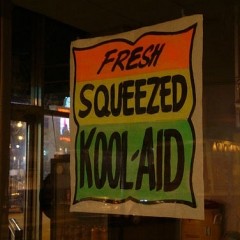
The keys to a highly effective banner advertisement are:
#1: Good Ad Copy, Focus on Relevancy.
If someone is on a page on your website that contains an article about how to stop a dog from chewing, then your advertisement should be promoting something to do with a product that stops a dog from chewing... even if the product you are promoting is a generic dog training product. You should focus the content of your banner on the reason why the visitor is reading YOUR webpage, this will make them more likely to click on your banner.

Here's another example, this time the banner is focussing on how to train a beagle (rather than just a generic dog training banner):

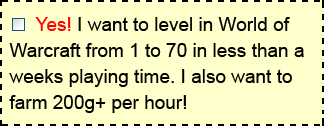
#2 Fake elements: This isn't essential, but often it works well, e.g. a fake scroll bar, fake msn messenger box etc. Even a fake check-box that looks like it is part of the page such as the one below:
#3 Animation: Banners with moving elements catch the eye, these can be great, so long as there aren't other moving elements on the page (otherwise it is overkill).

Don't with Banner Ads
What usually doesn't work and is a lot less effective are banner ads that might simply contain a product image, or might seem too cheesy and too spammy that it doesn't get clicked on.
You need to put yourself in the mind of the visitor and make sure that you make your banner advertisements as relevant as possible.
Want to know the software you need to create such banners?
You can use a free image program like paint.net , or The Gimp , in combination with Ulead Gif Animator
Using Banners on PPC
I've just been chatting with Marc Lindsay from PlrPro.com who has just told me that he has been testing using image ads instead of straight content ads for Google Adwords promotions, and he is saying that he has received up to 3 times higher clickthru rates on image ads (which is very high for the content network) and higher conversion rates overall too. I'm going to be trying this out myself very soon, sounds very promising!
Update: Google Banner Sizes
If you are creating Banner Advertisements for the Google Content Network, then these are the banner sizes:
- 468 x 60 (banner)
- 728 x 90 (Leaderboard)
- 120 x 600 (Skyscraper)
- 300 x 250 (Inline Rectangle)
- 160 x 600 (Wide Skyscraper)
- 336 x 280 (Large rectangle)
- 250 x 250 (Square)
- 200 x 200 (Small Square)
All Google content images must have a maximum 50k file size.
Also note that Google also allows swf format, so if you know anything about flash, or have a graphic designer who does, you can use this to create better looking banners that have low file sizes.
I hope this email helps you create a lot better images and banners for your websites, ones that are more relevant and more likely to get clickthrus.
All the best,
Mark
Photo: Derek Farr
Golf Beginner • 16 years ago
danilo • 16 years ago
I always thought that banner ads was dead.
Have to test it myself
ciao!
Christian • 16 years ago
Max • 16 years ago
Good info again.
Going to try a couple of image ads and see what happens.
Nothing lost
Cheers
Max Ryan
Jon Bonner • 16 years ago
Chopper Tattoo Review • 15 years ago
TYRONE WOODS • 14 years ago
Can anyone tell me which is a great animated gif sofware program, the one recommended in July 13, 2008 blog has been discontinued.
Thank you,
Tyrone
Bert • 14 years ago
DVD copier • 14 years ago
Tattoo Freddy • 14 years ago
Julia Duguay • 14 years ago
filmy erotyczne • 14 years ago
warcraft 3 cd key recovery • 14 years ago
kathy • 14 years ago
Ron Gilmore • 12 years ago